
Understanding Gaming Laptops
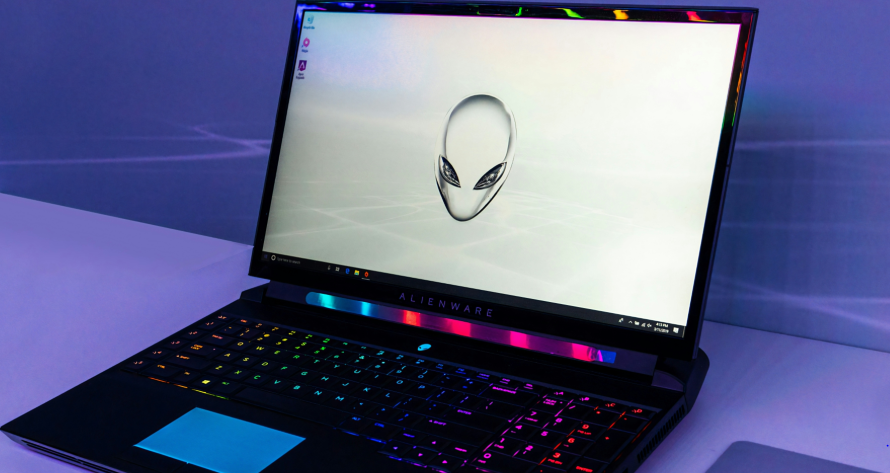
A gaming laptop is specifically designed to handle the demanding requirements of modern gaming. When selecting a gaming laptop, one must consider several key specifications that directly impact gaming performance and user experience. These include the processor, graphics card, RAM, and storage options.
The processor, or CPU, is the brain of your gaming laptop. It affects how quickly your laptop can perform tasks and run games. A higher clock speed usually results in better performance, especially in CPU-intensive games. Typically, gaming laptops come equipped with powerful processors, often from the Intel Core i7 or i9 series, or AMD Ryzen 7 and 9 series, which can handle multiple applications running simultaneously.
Next, the graphics card (GPU) is critical for rendering the graphics that bring games to life. Gaming laptops generally feature dedicated GPUs rather than integrated graphics. Models from NVIDIA’s GeForce RTX series or AMD’s Radeon RX series are commonly found in gaming laptops, providing high frame rates and improved image quality. This allows for a more immersive experience with smoother visuals and detail.
RAM (Random Access Memory) is another vital aspect, serving as short-term memory for your system. For gaming, a minimum of 16GB is recommended, enabling the laptop to run high-performance games alongside other applications effectively. More RAM can allow for multitasking without impacting performance, making it essential for a seamless gaming experience.
Finally, storage plays a significant role in how quickly games load and how much space is available for storing game files. Most gaming laptops come with SSDs (Solid State Drives) because they offer faster read and write speeds compared to traditional HDDs (Hard Disk Drives). An SSD not only decreases loading times for games but also enhances overall system responsiveness.
When purchasing a gaming laptop, carefully weighing these specifications is crucial as they collectively influence gaming performance and overall satisfaction. A well-rounded gaming experience is achievable with the right combination of processor, graphics capabilities, RAM, and sufficient storage options.
Top Affordable Gaming Laptops
For new gamers entering the digital landscape, selecting an affordable gaming laptop that provides exceptional performance is crucial. There are several budget-friendly options available that offer impressive specifications without straining your finances. Below, we explore some of the top laptops suited for gaming novices.
The Acer Nitro 5 is one of the most popular choices among beginner gamers. Priced around $800, this laptop comes equipped with an Intel Core i5 processor and an NVIDIA GeForce GTX 1650 GPU. Its 8GB of RAM and a 256GB SSD ensure smooth gameplay and quick load times, making it a formidable choice for those looking to play popular titles without investing heavily.
Another excellent option is the ASUS TUF Gaming FX505DT, which can typically be found for about $750. This laptop features an AMD Ryzen 5 3550H processor along with an NVIDIA GeForce GTX 1650 GPU, matching Acer’s performance capabilities. With 8GB of RAM and a 512GB SSD, it not only offers gaming prowess but also ample storage for various applications.
The HP Pavilion Gaming Laptop offers a balance of affordability and solid gaming performance at approximately $700. It is powered by an AMD Ryzen 5 processor and an NVIDIA GeForce GTX 1650, along with 8GB of RAM and a 256GB SSD. This laptop is particularly suitable for those just starting their gaming journey, as it can handle a range of games effectively.
Lastly, the Lenovo IdeaPad Gaming 3 is typically available for around $750. It features an Intel Core i5 processor and an NVIDIA GeForce GTX 1650 GPU, supported by 8GB of RAM and a 512GB SSD. This model stands out for its comfortable keyboard and good heat management, making it a reliable choice for prolonged gaming sessions.
These budget-friendly gaming laptops present excellent options for new gamers. They not only deliver respectable performance but also make the transition into the world of gaming easier and more enjoyable, all while remaining financially accessible.
Essential Accessories for Gamers
As the gaming industry evolves, the importance of having the right accessories cannot be overstated, especially for new gamers looking to enhance their experience. Various gaming accessories play a crucial role in improving gameplay, providing comfort, and ultimately boosting performance. Among these accessories, gaming mice, keyboards, headsets, and mouse pads stand out as essential tools for any serious gamer.
A gaming mouse is one of the first investments a new gamer should consider. Unlike regular mice, gaming mice are typically designed for precision and speed, featuring advanced sensors that can detect even the minute movements required in fast-paced games. Many models come equipped with customizable buttons, allowing you to program specific functions that can give you an edge in competitive gameplay. Look for models with adjustable DPI settings for greater control over sensitivity, and consider ergonomic designs to prevent strain during extended gaming sessions.
Equally important is the gaming keyboard. A good gaming keyboard can greatly influence your gaming experience. Mechanical keyboards, in particular, are favored by many gamers for their tactile feedback and durability. They offer customizable RGB lighting, which not only enhances the gaming atmosphere but can also indicate various settings during gameplay. Keyboards with programmable keys can save time and increase efficiency, allowing you to execute complicated commands seamlessly.
No gaming setup is complete without a sturdy headset. A quality gaming headset not only provides immersive sound but also allows for clear communication with teammates. Look for models with surround sound capabilities to gain a competitive advantage, as these can help you detect enemy movements from multiple directions. Comfort is also key; look for headsets with adequate padding and adjustable headbands to ensure a snug and comfortable fit, even during long sessions.
Finally, a good mouse pad can significantly affect your gaming performance. Large surface areas allow for better movement and fewer interruptions, providing a smooth glide for your mouse. Consider pads with a non-slip base to keep your setup stable. Some gaming pads even feature built-in wrist support for added comfort.
Choosing the Right Gaming Mouse
In the competitive world of gaming, selecting the right gaming mouse is crucial for performance and comfort. A good gaming mouse not only enhances your gameplay but also plays a significant role in reducing fatigue during long sessions. With a plethora of options available, it is important to know which features to prioritize.
One of the first features to evaluate is the DPI (Dots Per Inch) settings. Higher DPI settings allow for faster movement tracking, making it easier to aim accurately in fast-paced games. For most gamers, a DPI range of 800 to 1600 is sufficient, but some professional gamers may prefer settings above 2000. Adjustability is another essential aspect; a mouse that allows users to change DPI settings on-the-fly can provide an edge during gameplay.
Ergonomic design is another key factor when choosing a gaming mouse. Comfort is paramount, especially during extended gameplay sessions. Look for a mouse that fits comfortably in your hand and provides support, particularly for those who tend to grip the mouse tightly. Mice come in various shapes, designed for different grip styles such as palm grip, claw grip, or fingertip grip. Testing out different designs can help determine which model feels most comfortable.
Programmable buttons are also a valuable feature for gamers, allowing customization for quick-access commands or macros. This can be particularly beneficial in MMOs or MOBA games where multiple skills must be activated swiftly. Many gaming mice come equipped with software to aid in creating custom profiles for different games, further enhancing user experience.
For new gamers, several models stand out for their quality and features. The Logitech G502 HERO, Razer DeathAdder V2, and Corsair Scimitar RGB Elite are excellent options that provide high DPI settings, ergonomic designs, and programmable buttons. Investing in a quality gaming mouse can significantly improve gameplay and overall enjoyment.
Exploring Gaming Keyboards
When selecting a keyboard for gaming, two primary types to consider are mechanical and membrane keyboards. Each offers unique features and advantages, making them suitable for different gaming styles and preferences.
Mechanical keyboards are known for their individual switches under each key, providing a distinct tactile feedback and audible clicking sound with every keystroke. This feature can enhance typing speed and accuracy, which is crucial in competitive gaming environments. Their durability also stands out, as they can withstand millions of keystrokes, making them a worthy investment for serious gamers.
In contrast, membrane keyboards use a softer, more flexible layer of material beneath the keys. This design typically results in quieter operation and a more subdued feel when typing or gaming. For beginners, these keyboards might be easier to become accustomed to due to their softer keys and lower price point. Although they offer less tactile feedback compared to mechanical options, modern membrane keyboards have improved significantly and are ideal for casual gaming.
When choosing between the two, consider the type of games you play. For fast-paced first-person shooters or competitive multiplayer games, a mechanical keyboard would often be preferred for its responsiveness. However, for MMORPGs and simulation games where you may not be as reliant on rapid keystrokes, a membrane keyboard might suffice.
For newcomers, a few user-friendly options include the Razer Cynosa V2, which combines a membrane layout with customizable lighting features. On the mechanical side, the Logitech G Pro X is a compact option, allowing users to swap out switches based on their preferences. Both options present a balanced mix of performance and comfort, catering to varying skill levels.
Selecting the Best Gaming Headset
The gaming headset is an essential accessory for new gamers, significantly enhancing immersion and communication during gameplay. A quality headset can elevate the gaming experience by providing clear audio, a comfortable fit, and effective communication capabilities. Thus, understanding the key features is particularly important.
Firstly, sound quality plays a crucial role in the overall performance of a gaming headset. High-fidelity audio allows gamers to hear in-game details that could otherwise go unnoticed. This includes directional sounds that provide contextual cues during gameplay, such as footsteps of approaching enemies or distant gunfire. A headset with a good frequency response, typically between 20 Hz to 20 kHz, ensures that gamers can enjoy a full range of sounds.
Comfort is another vital aspect to consider when selecting a gaming headset. Since extended gaming sessions are common, a headset should provide a comfortable fit to minimize fatigue. Look for models with padded ear cups and adjustable headbands. Over-ear designs are often preferred, as they can provide a more immersive experience by covering the ears completely and blocking external noises.
Moreover, the quality of the microphone is essential, especially in multiplayer games where communication is key. A good microphone should offer clarity and noise cancellation capabilities, allowing your voice to be heard clearly without background interference. Headsets equipped with boom microphones are typically preferred, as they can be positioned closer to the mouth, enhancing clarity.
For those seeking recommendations, reputable brands include HyperX, SteelSeries, and Razer, each offering models designed to meet various gaming needs. The HyperX Cloud II is well-regarded for its balance of comfort and sound quality, while the SteelSeries Arctis series is known for its excellent microphone quality. In the end, choosing the best gaming headset involves considering sound quality, comfort, and microphone performance, ensuring an enjoyable gaming experience.
Understanding the Importance of a Good Monitor
A gaming monitor plays a critical role in the overall gaming experience, significantly impacting performance and immersion during gameplay. One of the key factors to consider when selecting a gaming monitor is the refresh rate. This measurement, expressed in hertz (Hz), indicates how many frames per second a monitor can display. Higher refresh rates, such as 144Hz or even 240Hz, are particularly beneficial for fast-paced games, providing smoother visuals and a more responsive gaming experience. For new gamers, choosing a monitor with a refresh rate of at least 60Hz is advisable to ensure a decent level of fluidity in gameplay.
Another vital aspect to consider is resolution, which determines the clarity of the images displayed on the screen. The standard resolutions include Full HD (1920 x 1080), Quad HD (2560 x 1440), and 4K (3840 x 2160). For beginners, a Full HD resolution is generally sufficient, providing sharp images without overwhelming the system’s graphics card. However, investing in a higher resolution monitor can elevate the gaming experience, especially if one plans to engage in games that rely on stunning graphics and detail.
Furthermore, the size of the monitor can impact gameplay as well. A larger screen can enhance immersion, allowing gamers to see more details and fostering a more engaging experience. However, the physical space available should also be taken into account. A 24 to 27-inch monitor is typically suitable for most gaming setups, striking a balance between screen size and comfort.
For beginner-friendly options, monitors such as the ASUS VG249Q, Dell S2417DG, and AOC CQ27G1 are excellent choices. These models offer impressive refresh rates, resolutions, and screen sizes while remaining budget-friendly. By selecting a good monitor, new gamers can significantly enhance their gaming journeys, ensuring an enjoyable and responsive experience.
Setting Up Your Gaming Space
Creating an inviting and functional gaming environment is crucial for both enhancing gameplay and ensuring long-term comfort. The first step in establishing the perfect gaming space is selecting an appropriate desk. Ideally, a gaming desk should offer ample surface area not only for your laptop but also for additional accessories such as a mouse, keyboard, and monitor. Opt for a desk at a comfortable height to maintain proper posture during extended gaming sessions.
Next, seating is another vital component of your gaming setup. A high-quality gaming chair can significantly improve comfort and reduce the risk of strain. Look for a chair that provides good lumbar support, adjustable features, and breathable materials. This will help you stay focused on your gaming experience without being distracted by discomfort.
Cable management is yet another often-overlooked aspect of setting up your gaming space. Disorganized cables not only detract from the aesthetic appeal of your setup but also can lead to accidents or damage to equipment. Consider using cable clips, sleeves, or even a cable management box to keep cords tidy and out of the way. You might also want to explore wireless accessories, as they can simplify management and reduce clutter.
Lighting is an additional element that can greatly enhance your gaming atmosphere. A well-lit space can improve visibility while minimizing eye strain. Utilize adjustable LED lighting or smart bulbs that allow you to set the mood according to the specific game. Moreover, natural light during the day can also boost your mood and concentration.
Finally, personalize your gaming area with decorations or themed items that reflect your interests. This can create a more inviting atmosphere, making your gaming sessions not only comfortable but also enjoyable. By thoughtfully considering these aspects—desk setup, seating, cable management, lighting, and personal touches—new gamers can cultivate an environment that complements their gaming lifestyle.
Common Gaming Mistakes to Avoid
As new gamers enter the world of gaming, it is essential to understand the common pitfalls that can hinder their experience. One of the most frequent mistakes is overinvesting in hardware and accessories before mastering the basics. Gamers may be tempted to purchase the latest gaming laptop, high-end peripherals, and additional accessories without fully assessing their needs. This can lead to unnecessary expenditure, especially when budget-friendly options can provide a satisfying gaming experience for beginners.
Another mistake that new gamers often make is neglecting the importance of software setup and optimization. It is crucial to ensure that all software is up to date, including the operating system, drivers, and game clients. Failing to maintain these updates can result in performance issues, crashes, and a frustrating gaming experience. Furthermore, neglected software can also expose the system to security vulnerabilities, making it essential for newcomers to prioritize these aspects of their gaming setup.
New gamers may also overlook the significance of ergonomics and comfort. Spending long hours gaming without proper seating or desk setup can lead to physical discomfort and even long-term health issues. Investing in a comfortable gaming chair and ensuring that the monitor is at eye level can greatly enhance the gaming experience. Additionally, new gamers might forget to establish a balanced gaming schedule, leading to excessive screen time that can impact overall well-being.
Finally, another vital consideration is the potential for online toxic behavior. New gamers should be aware of the dynamics in multiplayer scenarios and need to establish a positive online presence. Engaging with the gaming community constructively can enhance experiences and lead to valuable friendships. By avoiding these common gaming mistakes, newcomers can enjoy a more enriching and fulfilling gaming journey.